Budget planner and expense tracker for iPhone and Android
Budgeting that adapts to you
Plan your monthly budget, track what actually happens, and adjust as life changes. Budgetum helps you understand your money without pressure, rigid rules, or judgment.
Private
Your financial data stays on your device
Works offline
No internet connection needed
No account
No sign-up, no email. Just start.
No subscription
Free to use. Optional one-time Pro.
No ads
Nothing between you and your budget
Export anytime
Take your data with you as CSV
Not your typical budgeting app
Other budgeting apps focus on enforcing their method. Budgetum focuses on building your understanding so you can decide which method works best for you
Supports any budgeting approach you prefer
Built around one fixed budgeting method
Works offline. Your data stays on your device
Require financial account linking
Core features are free. Pro adds extras
Essential features require subscription
Built around your budget
Budget is just a feature
Designed for understanding your money
Focus on automation over understanding
Custom sections and categories
Predefined category systems
Budget your way, understand every month
Start simple, add detail when it helps, and keep full control of how you plan and track.
Plan
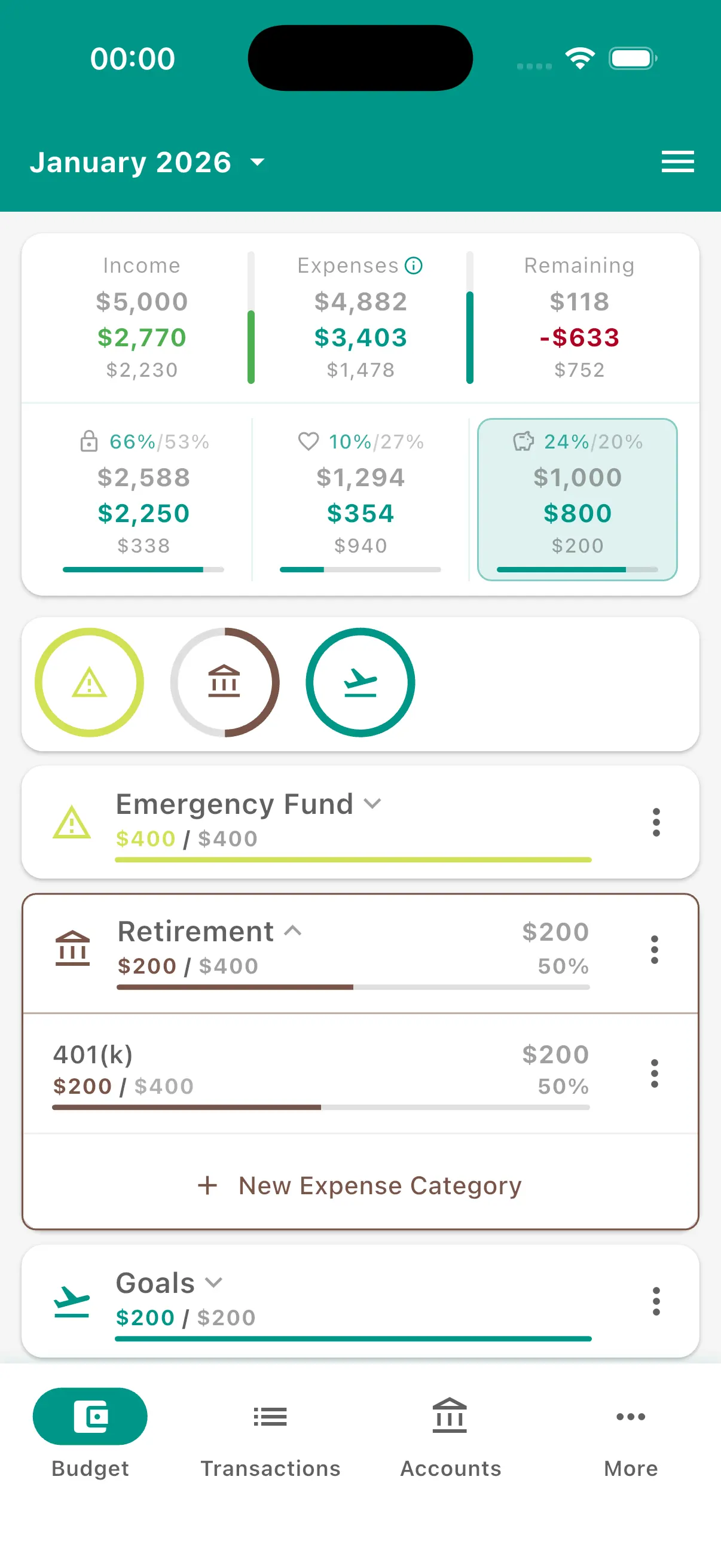
Simple Budgeting
Plan every dollar in minutes, then see what's left as the month goes on.
- Planned, spent and remaining for every category at a glance
- Zero-based, envelope, 50/30/20 or your own way
- Monthly budgets or payday-to-payday periods
- Copy last month's plan instead of starting over
Track
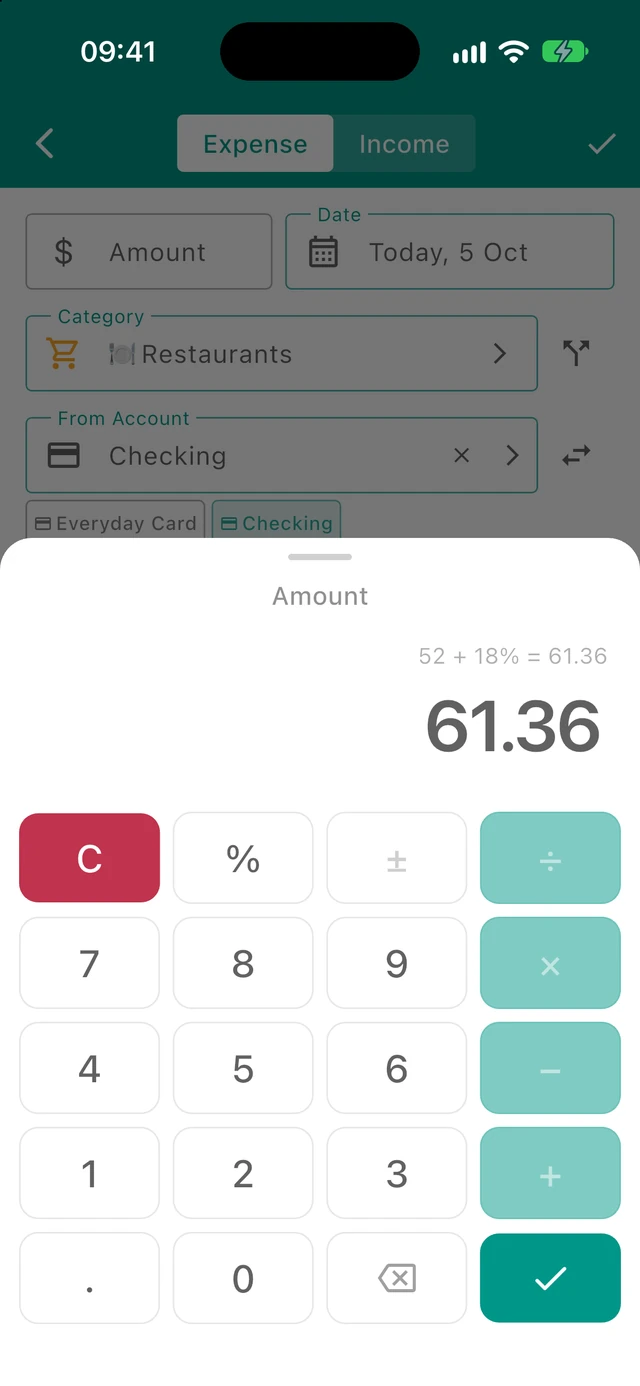
Track Expenses
Add an expense in a few taps. Add more detail only when it helps.
- Built-in calculator and quick date picker
- Favourites for purchases you repeat
- Split one receipt into several categories
- Accounts, tags and stores are optional
Understand
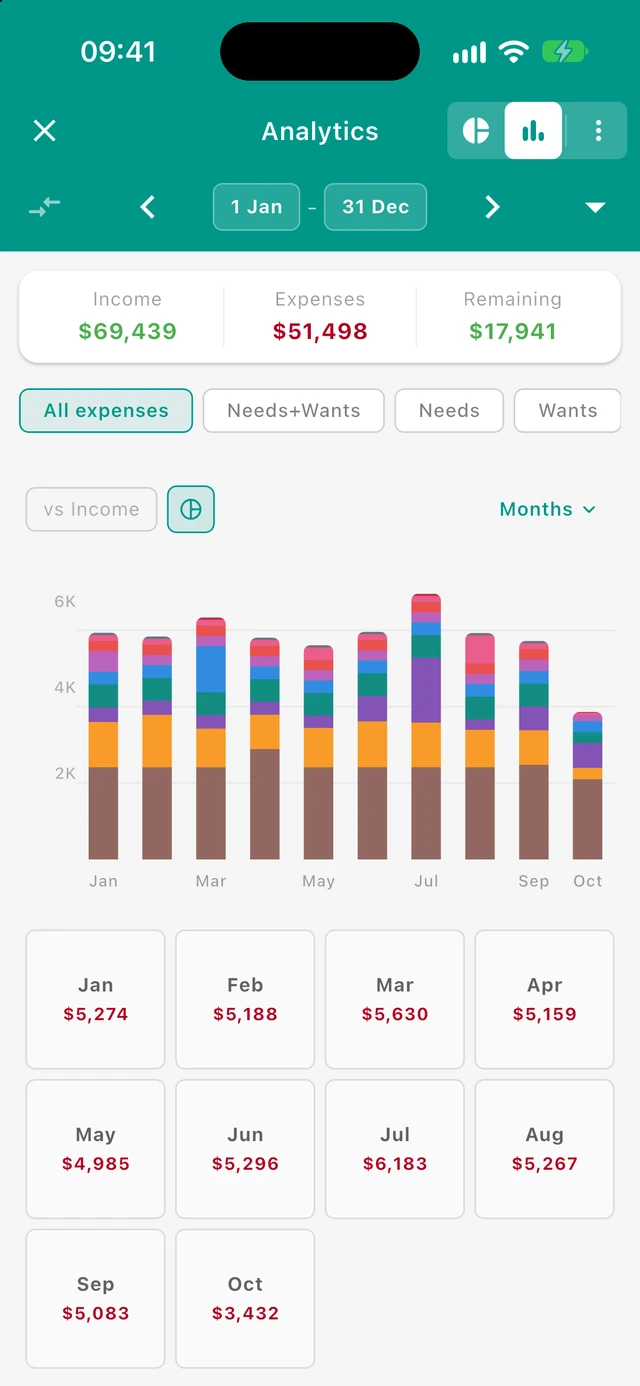
Understand Your Money
Your whole year, month by month. Spot patterns without lectures or guilt.
- Breakdowns by section, category, store, tag or account
- Trends with month-to-month comparisons
- Needs, wants and savings at a glance
- Spending calendar for the whole year
Accounts
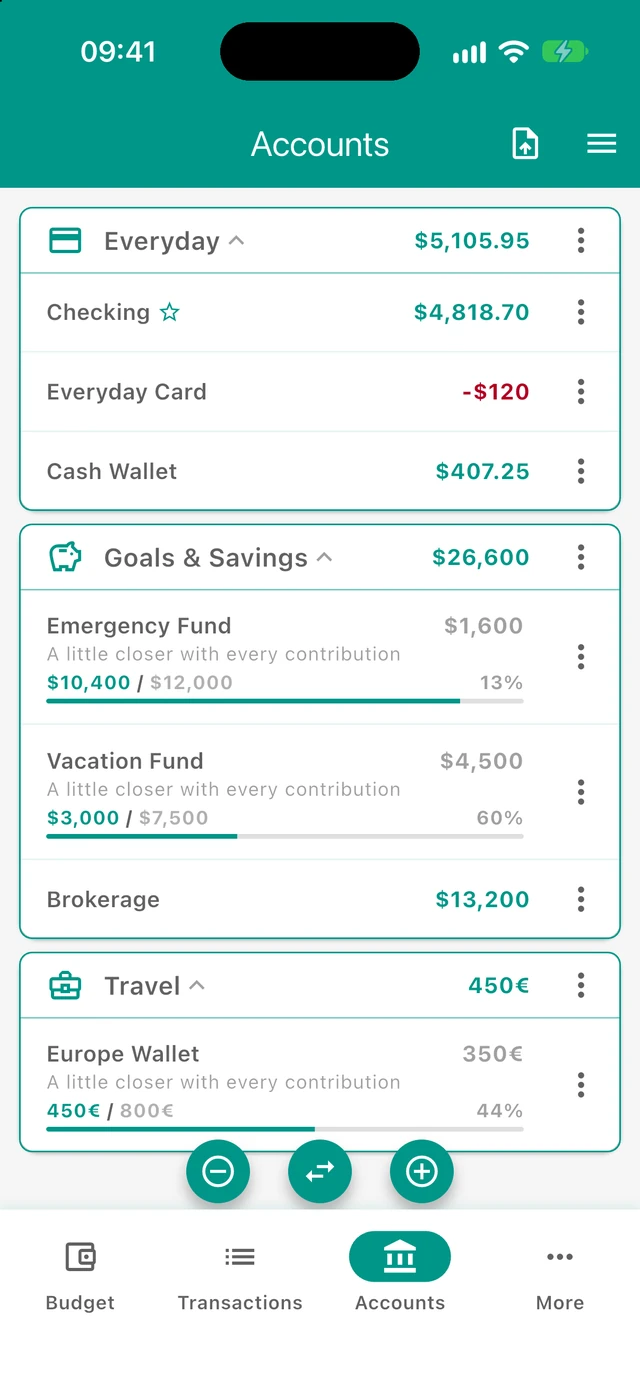
Every Account, One Place
Checking, cards, cash and savings goals, each with its own balance.
- Transfers between accounts
- Accounts in different currencies
- Savings goals with progress
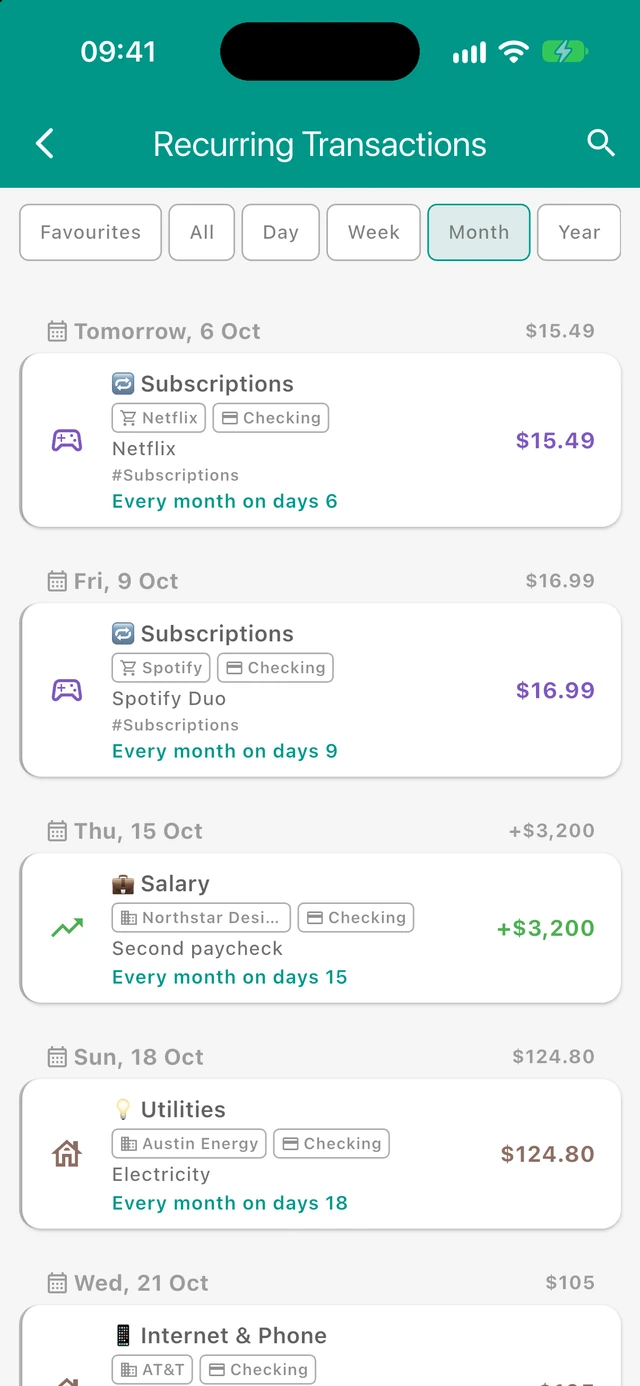
Recurring
Know What's Coming
Bills, subscriptions and paydays, scheduled ahead and added for you.
- Repeats added automatically on their dates
- See upcoming bills before they hit
- 5 recurring transactions free, unlimited with Pro
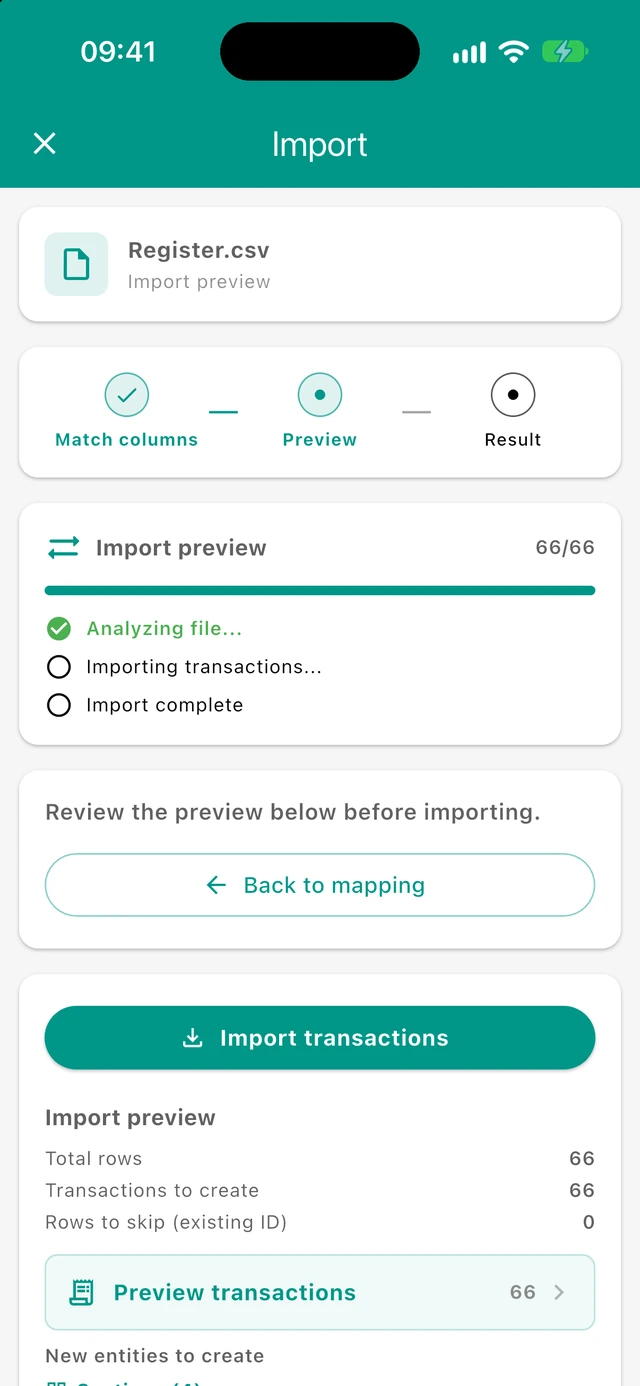
Import
Switch In Minutes
Bring your history with you. Import from YNAB or any CSV file.
- Budgetum CSV, YNAB Register.csv, or another app's CSV
- Match columns and preview before anything is saved
- Pro: match a bank statement file and approve rows in seconds
- No bank login, files are read on your device
“I switched from YNAB and I have enjoyed using this app. … I found setting up my budget with this app easier than YNAB.”
And Much More
Optional tools for when you want more detail. Core budgeting is free.
- Pro
Bank statement matching
Reconcile an account from your bank's CSV or XLSX file
- Pro
Smart sets
Save filters by tag, store, person, account and more as reusable sets
Tags
Label trips, projects or routines across categories. 5 free, unlimited with Pro
Split one receipt
One purchase, several categories
Payday budgets
Budget from payday to payday, or any period you choose
Deep analytics
By category, store, tag, account or set
Make it yours
Show or hide any detail. Pick your app color and section colors and icons
Multiple currencies
Accounts in any currency, with rate suggestions
Stores and people
See where your money goes, by store or person
PDF and shared plans
Export a budget as PDF or share a read-only web link
Backups
Save a full backup file and restore it anytime
Desktop analytics
Explore your data on a big screen, privately in your browser
Quick overview
Plan it. Track it. Understand your money.
A short walkthrough of how Budgetum works: set up a budget, add what you spend, and see where your money goes each month.
More tips and how-tos on our YouTube channel.
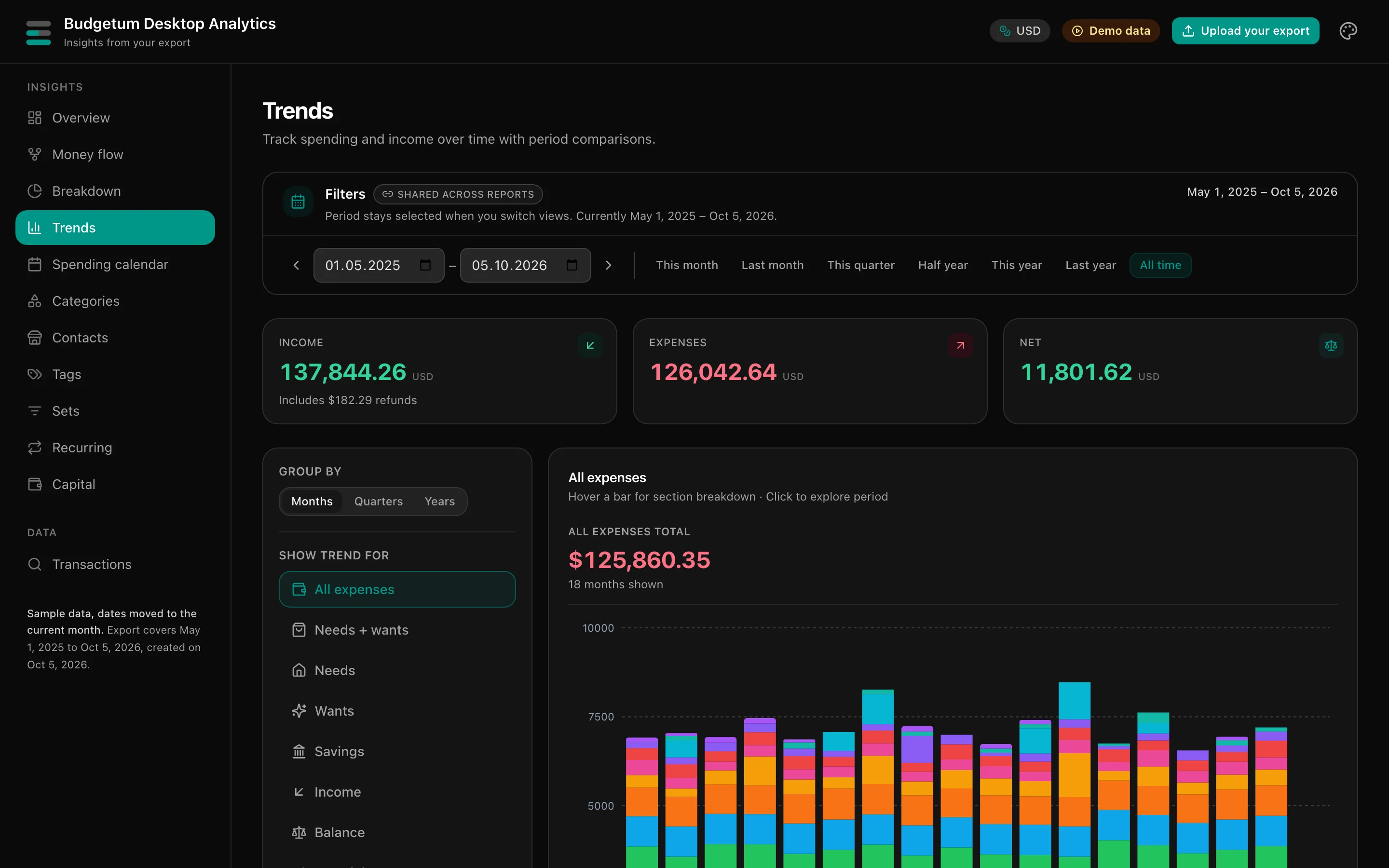
Desktop Analytics
Your budget on a big screen
Open your Budgetum export on a computer for bigger money reviews. Free, no account, and it works right in your browser.
- Private by designYour export is read in your browser. Nothing is uploaded.
- Room to dig deeperMoney flow, breakdowns, trends, spending calendar, sets, recurring and capital on a big screen.
- Straight from the appMore → Import / Export, turn on Include analytics data, and drop the file in.
- Try it firstExplore with demo data before you open your own export.
A tool, not a teacher
Most budgeting apps try to teach you a “correct” way to manage money. They push rigid systems and treat real life as a mistake.
Budgetum is built differently: understand first, rules second. Plan your way, track what happens, and adapt without pressure.
“Understanding your money is more important than following rules.”
BudgetUM: the UM stands for Uplift Myself. Because managing your finances should lift you up, not weigh you down.
Understanding Over Judgment
Overspending is information, not failure. Budgetum shows what happened so you can respond calmly.
Flexible Over Rigid
Use zero-based, envelope, loose planning, or simple tracking. Different methods are all valid.
Offline and Privacy First
Your data stays on your device. No account required, no tracking, no selling your financial data.
Practical, Not Ideological
Budgetum is a tool, not a teacher. It helps you see your numbers clearly and choose what to do next.
Loved by people who budget their way
The best budgeting app
“I've tried so many budgeting apps and all of them needed an account, a subscription, my bank details etc etc. This app is absolutely perfect for me. Thank you so much for creating this app, this is exactly what I needed!!”
Nehru rqbfagsgnUS · Aug 2026Excellent
“This budget planner is one of the best, if not the best. The developer is very helpful and open to new ideas and suggestions. The ChatGPT integration in the app is one of the best features for getting help.”
@Alfaris71US · Aug 2026Truly Free (No Ads, No AI, No Selling Your Data!)
“… I tried using other apps between Notion and Budgetum, and they all had too many ads, or nagged me to use their AI features, or were basically useless without a subscription. Budgetum provides a solid user experience with a deep care for and attention to what a budgeting app is meant to be. Simple, sleek, and effective.”
willtschoeUS · Jul 2026That is perfect app for me
“No annoying ads, simple and easy, the most important being able to set amount of expected expenses, really easy to customize in every way possible, used it for last 6 months, love it so so much”
SofironniUS · May 2026No paywalls!!!!
“Easy user interface. Aesthetically pleasing. No ads, no subscriptions. Need I say more?”
Wolf movementUS · Feb 2026A breath of fresh air
“Other apps are bloated and gate features behind subscriptions. Budgetum is simple and does everything I need, while being free. I hope it stays that way.”
Ron FriedmanCA · Jan 2026
Frequently asked questions
Everything you need to know about Budgetum.
More answers in the Help Center, with a step-by-step guide for every screen.
Need help with Budgetum? Just ask.
Skip searching through docs. Ask in plain language and get clear answers on setup, features, and workflows.
Download the free budget planner app
Budgetum is a simple budget planner and expense tracker for iPhone and Android. Plan it, track it, and understand your money.
- Free to start
- Works offline
- No account
- Your data stays on your device